Press "Enter" to skip to content

Month: November 2026

Cyberpunk 2077 without hands

How it started


Proper autumn has finally set in outside my window, and the rain barely stops. I started going out less and less, and before long I got bored—which often happens when I stay indoors for too long.

Looking for something to do, I asked my friend Sergey for advice. Like me, he has spinal muscular atrophy (SMA). He recommended the Netflix anime series Cyberpunk: Edgerunners. I binged all ten episodes and didn’t want to leave Night City just yet, so I decided to download Cyberpunk 2077 by the Polish studio CD Projekt Red.

Because of SMA, my hands barely work. I can move a mouse, left-click, and press a few keys on a Razer Tartarus Pro gaming keypad. Everything else is handled by PlayAbility, an app that turns spoken words and facial expressions into key presses. I figured that with PlayAbility and a couple of extra buttons, I could really play.

The short answer: yes, I could, and it is a real, full-scale game. The long answer starts with the tutorial mission. That is where I discovered that the game expects very different things from its keys: some actions need a crisp tap, others need a hold, and every hold has its own duration. Crouching only works on a quick tap and ignores a slow press. Tapping T opens a notification, while pulling up the phone takes a half-second hold. Getting out of a car requires holding F for a full second.

PlayAbility, meanwhile, only offers four press modes: a short tap (0.1 s), a long press (0.3 s), a toggle, or holding a key for as long as a facial gesture lasts. Each of the game’s awkward inputs needed its own workaround. I even wrote to the PlayAbility developers asking them to add a setting for custom hold durations.

I found those workarounds together with Claude, an AI assistant. I described by voice what wasn’t working; Claude inspected the game’s configuration files, wrote a script, and helped me test it.

What I play with

My controls are split across four layers, and each one covers what the others can’t.

Tool Role
Mouse Looking around, aiming, shooting with left click
Razer Tartarus Pro + Synapse Thumbstick movement, reload, aim, macro crouch
PlayAbility Spoken Russian words plus face and head gestures
AutoHotkey script Custom hold timings, key combos, on-screen cheat sheet

The script is written in AutoHotkey, a free Windows program that triggers keys and mouse buttons according to rules you define. Our script only acts inside the game window; in other programs, the same keys work as usual. It sits as an icon in the system tray, and any of its features can be switched off from its menu with a single mouse click.

Where PlayAbility stops at 0.1 s and 0.3 s presses, the script bridges the gap. A spoken word triggers a spare key, and the script turns it into the exact action and timing the game expects. One desktop shortcut launches the game together with the script, and when I close the game, the script closes itself.

How the setup went

Every step started with a single sentence from me, like “I can’t crouch.” Then Claude looked into the game’s configuration files to see how the engine expects that input, and fitted my controls to match. The voice commands below are the Russian words I actually say out loud while playing.

Problem Cause Fix
Crouching Slow hand press ignored Synapse macro (0.05 s tap)
40+ commands Too many words and gestures Slim cheat sheet at top of screen
Stuck keys Toggle mode leaves keys held Top bar warns at 0.7 s, turns red at 5 s
Tangled bindings Two actions on one key Reset to default, kept crouch on 0 and tag on 5
Heavy attack Needs 0.3 s+ left-click hold Spoken word «бокс» (“boxing”, 0.6 s hold)
Dodging Direction hold + quick Ctrl tap Four words: «рывок», «откат», «запад», «восток»
Phone Needs 0.5 s hold on T «новости» (“news”, tap) and «телефон» (“phone”, 0.5 s)
Weapon wheel Needs held Alt, no spare buttons «колесо» (“wheel”) holds Alt until click, blocks Alt+Tab
Driving Nothing left to steer with «руль» (“steering wheel”) mode steers by turning my head
Sharp steering Held arrow key locks wheel fully Short pulses, reaching full lock after 4.5 s
Exiting a car Cheek gesture too short for 1 s hold In driving mode, script holds F for 1.2 s
Menu actions Upgrade and Disassemble need 0.4–0.8 s hold Cut hold to 0.05 s in inputContexts.xml
Braindance Rewinding requires a held key «мозг» (“brain”) toggles rewind on and off

One thing surprised me: for some reason, the developers removed the option to simply click certain menu actions with the mouse. For example, “Upgrade” at the ripperdoc and “Disassemble” in the inventory only work from the keyboard, and only with a hold. There may be mods that fix this, but since I am completely new to the game and haven’t set up mods yet, we simply shortened the hold duration in the game’s inputContexts.xml settings file—the same trick “instant crafting” mods use.

Even a studio as renowned as CD Projekt Red only covered the basics for accessibility. Aiming, sprinting, and crouching can be switched from hold to toggle, and there are subtitles. But how long you have to hold a key cannot be changed in the menus at all, and some interface actions ignore the mouse entirely. For a player who can’t hold a key down for long, that is a wall I had to get around on my own.

Mistakes and lessons

  • Not every game file is safe to edit. Changing one key-layout file (inputUserMappings.xml) stopped the game from starting, so we restored the original and now back up every file before editing.
  • Timing matters more than the key itself. The same key does completely different things on a tap and on a hold; almost every roadblock came down to press duration.
  • Two actions on one key cancel each other out. When a command suddenly “does nothing,” look for duplicate bindings first.
  • One gesture can do different jobs. Turning my head triggers my implant and scanner on foot, but steers when I am in a car; one spoken word switches the mode and brings up a yellow cheat sheet right away.
  • Passing the error check isn’t enough. Once the script passed validation but crashed on the first held key because AutoHotkey ignores letter case in names, so now Claude tests a copy that logs key presses instead of sending them to the game.
  • Distrust is useful. When I thought Claude was getting me confused, it didn’t argue—it recorded which presses actually came from the mouse, proving that checking the facts beats a confident tone.

Where it stands

In just a few days, Night City became playable with about forty spoken words, five face and head gestures, the mouse, and four Tartarus buttons. Steering through the rain-slicked streets by turning my head, crouching via macro, and glancing at the top-screen cheat sheet are already tested in action, and I am tuning the rest as I play through the story.

We deliberately chose single-word commands that can’t be confused by ear, with no similar-sounding neighbors. That is why my combat dodges are «запад» (“west”) and «восток» (“east”) rather than “dodge left” and “dodge right”—in the middle of a firefight, distinct phonetics matter.

The main thing I took away: you don’t have to adapt to the game. Every awkward spot can be named out loud and reshaped to fit you.

If you also play with limited mobility, tell me in the comments which games and settings have worked for you. And if you make games, remember: a setting for hold duration and the option to click any menu button with the mouse cost little, but they open the game to players like me.


Leave a Comment
Spa Day and a Blind Wayfinding presentation!

We have some great events coming up this week!

Monday will be our Manual Wheelchairs 101 Learning Lab from noon to 1, and then Wheelchair Spa Day with Rosemary and Liz will run until 3pm! Bring your wheelchair, bring your friends and family, and we’ll do some deep clean and basic maintenance together on our mechanical companions. We have a massage gun and a comfy couch (and actually an entire massage table) along with tea, coffee, fruit and pastries to share for the human part of Spa Day!

On Tuesday, from 1:30 to 3pm, Join Josh Miele and his UC Berkeley engineering masters’ students, for their presentation of a capstone project on Blind wayfinding. We will tour GOAT Space and talk about disability-led engineering for adaptive and assistive tech!

Josh and his organization, CAOS (Center for Accessibility in Open Source) are friends of GOAT. Our nonprofit missions are very aligned, and we stand in awe of their excellent acronym game! Let the wild GOAT CAOS begin!

Leave a Comment

My Journey into AI: From My First Image to Building a Game

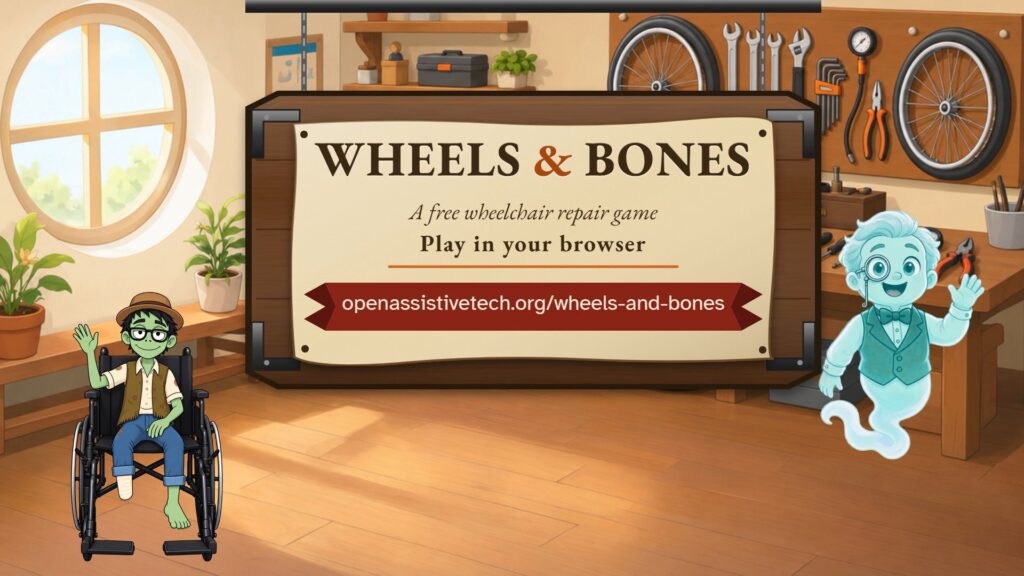
Wheels & Bones title card in a cozy wheelchair repair workshop. On the left, Martin, a green zombie in a hat and glasses, sits in a wheelchair and waves; on the right, Barty, a friendly mint-colored ghost with a monocle and bow tie, waves too. The sign reads "A free wheelchair repair game. Play in your browser. openassistivetech.org/wheels-and-bones".
Martin and Barty invite you to the workshop.

First, a little context about me. I have spinal muscular atrophy (SMA). I use a power wheelchair, which I drive with my chin. My hand barely moves. Someone places it on my mouse, and thanks to the mouse’s slippery Teflon feet and a very high sensitivity of 5,000–6,000 DPI, I can slide it just enough to move the cursor and click with one finger. I type the same way, one finger at a time on an on-screen keyboard. It’s very slow, and my hand gets tired quickly. I once tried to learn programming, but my typing finger became so inflamed from all the writing that I had to give up. Yet over the past three and a half years, I’ve taught myself to work with AI tools, and recently I used them to build a whole game. This is the story of how that happened.

How it all started

My journey into AI has been quite a winding road.

It all started on March 7, 2023. Everyone seemed to be talking about neural networks and some incredible technological breakthrough, and I barely knew what any of it was.

I got curious and started exploring. Eventually, I came across Midjourney, which was still running through Discord at the time, and tried generating my very first image.

I was absolutely amazed. You could simply type a few words, describe what you wanted to see, and the AI would create an image based on your description. I wanted to understand how it worked and what else this technology could do.

The first steps and the first challenges

I started looking for information, and YouTube was my first stop. I came across a video by a Russian-speaking YouTuber from Armenia who explained Stable Diffusion. He talked about how the model worked and showed how he was writing code to improve its results.

At the time, it all seemed like pure magic to me.

But getting Stable Diffusion to run meant going to GitHub, downloading a repository with scripts and libraries, installing dependencies, and configuring the environment properly. I had absolutely no idea how to do any of that.

Still, I started reading the documentation, working through it slowly and carefully, step by step. I don’t think I managed to get everything installed correctly on my first or even second attempt. I had to sort out dependencies and add Python to the system PATH.

But eventually, it worked!

I generated some kind of Chinese porcelain figurine. It looked like something halfway between a real photograph and a 3D model, except that it was incredibly blurry. To put it mildly, the result wasn’t great. But it sparked a huge curiosity in me: what else could I create with these tools?

After that, I started generating pretty much anything that came to mind.

AI-generated portrait of a dark alien queen in a black mask with pink horns and ornate pink-and-black robes, lit by pink neon.
One of my early Stable Diffusion images, March 2023.

From experimenting to helping others

I remember chatting in an online community for people with SMA. One woman asked me to create an image of a wheelchair user with a body type similar to hers.

We spent an entire day trying to get the result right.

That was when I realized that image generation wasn’t just entertainment. These tools could help create representations that were difficult to find in ordinary stock-image libraries, bringing ideas to life that would previously have required a lot more resources.

Another request still makes me smile. A friend of mine who has no legs asked me to create a new social media profile picture: a man without legs, sitting in a wheelchair and rolling down a highway.

It sounds simple, but I spent an entire evening working on it. Back then, image models had a poor grasp of anatomy and simply wouldn’t draw a person without legs. No matter what I tried, the legs kept coming back! It wasn’t easy, but it was an interesting experience.

My hobby even earned me some money. Another acquaintance from the SMA community was planning to open a small shop selling clothes for pets, and he asked me to generate photos for his posters. It took me four days to make ten pictures, and I earned about $50. Not a fortune, but it was my first paid work with AI.

Three AI-generated pictures of cats in human clothes: two cats in pastel coats among spring blossoms, a tabby in a pink trench coat on a sunny street, and two cats in winter coats and sunglasses on a snowy street.
Cats in human clothes: a few of the pictures I generated in 2024.

From that point on, I started looking for new information every day and experimenting with different settings and models. I wanted to improve the results and get as much as possible out of my fairly limited hardware.

I found a whole community of enthusiasts on Reddit and Telegram. People shared their experiences, helped each other, and constantly experimented with new things.

That was the beginning of my journey into open-source AI. By now, I’ve spent more than three and a half years experimenting with tools for generating images, audio, video, and 3D models.

How the game came together

There is one thing I really want to make clear: the idea for the game belongs entirely to Olga. Without her, I probably wouldn’t even have dared to try creating something like this.

Olga came up with the idea for an unusual repair workshop this summer and told me how cool it would be to create something along those lines. Her idea really caught my attention, and I started thinking about how to bring it to life and turn it into a complete game.

In roughly a day or two, I developed the characters, their personalities, and the way the game would work. Then I gave everything to Claude to help me write the dialogue.

The game is called Wheels & Bones. It’s a free game about repairing wheelchairs. Martin, a good-natured zombie whose leg keeps falling off, opens a repair workshop with the help of Barty, a friendly ghost who once watched the old masters at work and whose advice isn’t always right.

Their clients are fairytale creatures, but the wheelchairs and repair procedures are real, based on manufacturers’ manuals.

You can play it in your browser at openassistivetech.org/wheels-and-bones, and its source code is available on GitHub.

The very first version of the game was created entirely on my home computer using locally running models. I generated the backgrounds and characters with Qwen-Image 2.1. The earliest 3D models were created with TRELLIS and Hunyuan3D.

Looking back now, I realize how important two tools have been to me: Handy and Claude.

Handy is my voice, and Claude is my hands

Without Handy and Claude, I probably wouldn’t have been able to make any of this happen.

Handy is an open-source speech-to-text app. It gave me a way to communicate more freely and work with long pieces of text. It allows me to express my thoughts, develop ideas, and interact with tools that would otherwise be much harder for me to use.

Handy is my voice.

And Claude is my hands.

Claude helped me write code and scripts, create automated tests, find bugs, audit the project, and deploy new versions of the game. We gradually fixed problems, checked changes, and moved forward one step at a time.

Our start wasn’t smooth, though. When Claude and I began the very first version of the game, it suggested drawing everything with flat geometric vector shapes. The result looked so awful that I lost heart and put the game aside for two or even three months.

But when I came back to it, Claude turned out to be incredibly good at coding. One case I remember well: Olga told me that on our website, the page froze right after you pressed Start on the title screen. Not just the game, the whole page. I couldn’t figure out why. Strangely, it didn’t happen if you opened the settings first.

Claude traced it to the music. When the game switched from the title theme to the next track, it faded the old one out and waited for the fade to finish. But in a browser, the game and its sound share a single thread, and on the first launch the browser’s audio might not have started yet. The fade never moved, and the game waited forever, taking the page down with it.

Claude rewrote the music switch so it no longer waits for anything, and wrote a small test that opens the game in a browser with the sound turned off. The old version froze every time; the new one never did.

Another time, Claude found a memory leak: every wheelchair the player looked at stayed in the phone’s memory until the game froze. It fixed the leak and added tests to catch it in the future.

I can’t write even a single line of code on my own. That’s why it’s so remarkable to me that these tools have allowed me to go all the way from an idea to a working project.

How I keep learning

A large part of my day is spent searching for new tools and models in the open-source AI world. I’m constantly looking at what’s new, which models have become more accessible, and what might be useful for my work.

I use ComfyUI, a node-based interface for building workflows with different AI models and tools. Instead of working with each tool in isolation, I can connect them into a single workflow and build my own pipelines for generating and processing content.

I experiment with tools for generating images, video, audio, and 3D models. Most of the time, the videos I watch on YouTube aren’t for entertainment. They’re tutorials showing how different tools work and how to use them effectively.

When it was time to prepare the game for release, I realized that I needed to improve the graphics and the game’s assets.

The free local models alone weren’t enough to achieve the quality I wanted. So I brought ChatGPT into the process, and it helped me redraw the backgrounds, character portraits, and icons.

Later, I used Meshy, a paid 3D generator, to create the 3D models. It produced more detailed results than the simpler models I had started with.

I also made the promotional video with Claude’s help. Most of the scenes were generated locally with MiniMax H3, a video model that can bring a character from a still image to life and synchronize their lips with an audio track. One scene was generated using Google’s Veo.

The characters’ voices were created with Qwen3-TTS, an open-source text-to-speech model that runs locally. It can design a new voice from a simple description in words, so each character got a voice that suits them.

Some characters were generated against a green screen so that we could remove the background and place them into the scene. Finally, Claude assembled everything in HyperFrames, an open-source tool that turns web pages into video: the titles, transitions, subtitles, and music.

This whole process has reinforced something I’ve come to believe: modern tools make it possible to create complex things even if you don’t have traditional programming, 3D modeling, or video-production skills.

Why this matters so much to me

I often think about how far I’ve come over the past few years.

I have physical limitations that make many everyday activities difficult. Communication and expressing myself in writing have also always been challenging for me. Even in my best years, writing several pages of text on my own was difficult.

And now I can create projects like this.

I can develop characters, design game mechanics, create visual assets, and take part in software development. Not because I’ve suddenly learned to do all these things in the traditional way, but because new tools have appeared that help me work around my limitations.

At the same time, I don’t want to give the impression that all of this happened automatically. Behind it are years of learning, experimentation, reading documentation, solving problems, and trying to understand new technologies.

And, of course, the people who shared their ideas and gave me the opportunity to try something new have played an important role. In the case of this game, that person was Olga. Her idea gave me a starting point and the courage to take on something I might never have attempted on my own.

I think the potential of AI in the lives of people with disabilities is still seriously underestimated.

AI isn’t just a way to automate work or entertain ourselves. For us, it can be an accessibility tool that opens up new opportunities for creativity, learning, and professional development.

It allows people with disabilities to contribute to projects and bring ideas to life that once seemed out of reach — alongside everyone else.

That’s why I keep experimenting, learning, and creating new things. Not because I know everything, but because I now have the opportunity to try.

And sometimes, having the opportunity to try is the most important thing of all.


Leave a Comment