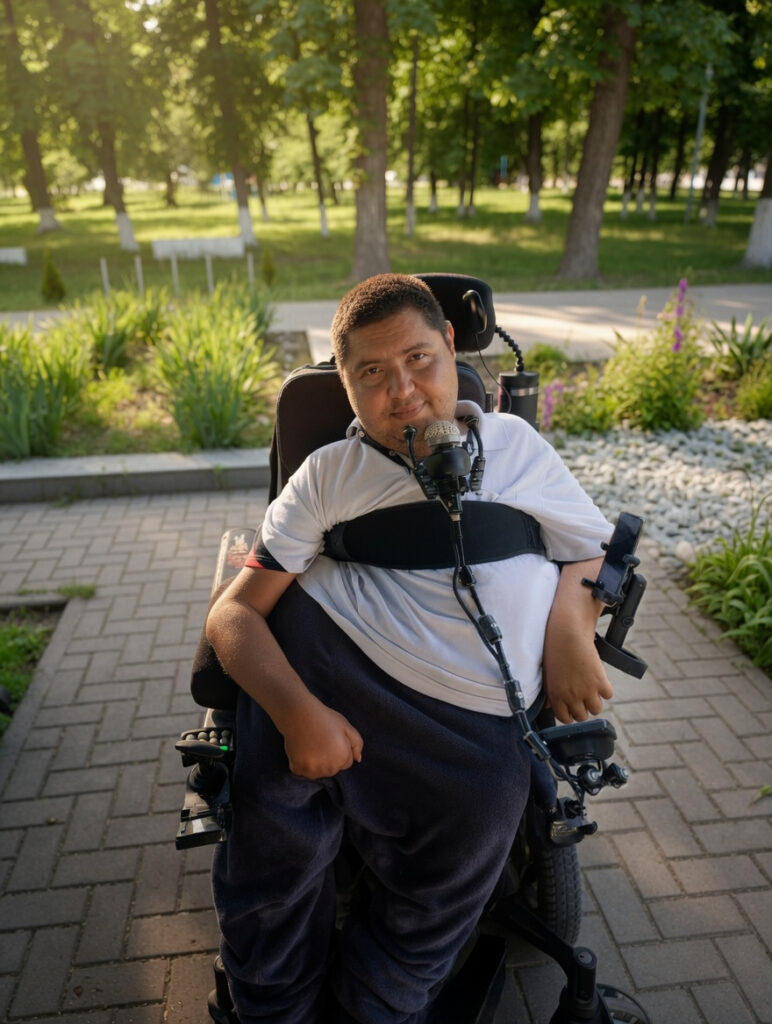
My journey began when I finally outgrew the wheelchair I had used every day for nearly twenty-four years. It no longer met my needs. My feet constantly pressed against the floor, causing severe pain, and as my neck muscles weakened, it became increasingly difficult to keep my head upright throughout the day. More and more often, my head would simply fall backward. I knew I needed a wheelchair with proper support, including a headrest.
We contacted the local social services, which provide standard wheelchairs every three years, hoping they could help. Unfortunately, they told us they did not have access to specialized equipment. Meanwhile, my old wheelchair was literally falling apart. The right axle had become bent, and it was obvious that I could not continue using it much longer.
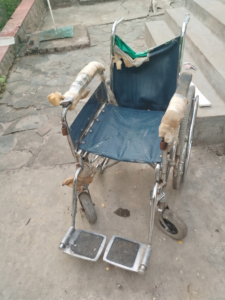
My mother convinced me that we would have to find a solution ourselves.
I started searching local forums and classified ads for used power wheelchairs. There were a few available in Moldova, but every one I found was in terrible condition. Some were heavily rusted, while others were missing important parts.
Since my father worked in France, I decided to expand my search there. The market was much larger, and I also had relatives living nearby. I made an agreement with my cousin’s husband: if I found a suitable wheelchair, he would inspect it and purchase it on my behalf.
I spent countless hours browsing listings on LebonCoin. Several promising Quantum models slipped away before we could finalize a deal. One excellent Invacare looked perfect, but it was located on the opposite side of the country, making pickup impossible. Around Paris and the surrounding region, most options were either extremely expensive or very outdated.
Eventually, I found a Permobil F3 located roughly 250 miles from Paris. My cousin’s husband contacted the seller, and everything initially seemed promising. Then, a few days later, the seller informed us that the batteries were dead. Traveling such a long distance without being able to test the wheelchair was simply too risky.
Fortunately, another option appeared: a Permobil F5 located only about twenty-five miles from my cousin’s home. He visited the seller the very next day and purchased it for me.
In the photos, it looked fantastic.
Only after the purchase did we discover that it already had 3,600 miles on it.
I was disappointed, but I had little choice. I needed a wheelchair.
That same evening, it was shipped to Moldova. Four days later, it arrived at my home.
I could hardly contain my excitement.
At the same time, I was terrified.
My right hand had become significantly weaker over the years, and I worried constantly about whether I would even be able to drive the chair.
When it finally arrived, they delivered it directly to our house. We immediately attempted to transfer me into it using a hoist.
The first attempt failed.
The upper lateral supports were positioned too high and too close together. The previous owner had been much thinner than I was. We decided to remove them, but even that became a challenge. My mother searched the house for tools and found a set of hex keys that barely fit. After a tremendous effort, she managed to remove one support. The second one refused to move.
She spent over an hour fighting with it.
We called a neighbor who promised to help but never showed up. After waiting for two hours, my mother went outside and asked another neighbor, a seventy-six-year-old man, for assistance.
At first he refused, insisting that he knew nothing about wheelchairs. Eventually he agreed to try.
For half an hour he struggled with the seized bolts. Nothing worked. Finally, he fetched a hammer.
I watched in absolute horror as he struck my newly purchased wheelchair with it.
Remarkably, the bolts finally came loose.
Afterward, he practically fled the scene.
Another neighbor later helped us adjust the backrest, and we tried once again to seat me in the chair. This time I could sit, but only on the very front edge of the seat. It was cramped, unstable, and extremely uncomfortable.
We stopped for the day.
The following morning, my mother watched YouTube videos and widened the chair by adjusting the armrests. Unfortunately, many of the adjustment bolts had rusted solid while the wheelchair sat unused in a garage. We still couldn’t position everything correctly.
When I sat down again, a new problem appeared.
The cushion was far too uncomfortable.
After twenty or thirty minutes, my left leg would go numb and intense pain would begin.
That marked the beginning of a long and exhausting struggle.
Every day we adjusted something. The headrest. The backrest. The seating position. The leg supports.
Nothing worked.
Without proper support around my pelvis, I constantly slid to one side and ended up pressing most of my weight against the armrest. Large bruises formed along my left side. I still could not tolerate more than thirty minutes in the chair.
I felt completely helpless.
The wheelchair that was supposed to restore my independence had become a source of pain and frustration.
Day after day, failure after failure, I sank into depression.
I couldn’t use the wheelchair.
I couldn’t properly use my computer.
I cried because I felt trapped.
Desperate for solutions, we began improvising.
An old transfer board that I no longer used was attached to the chair using wire and zip ties. The setup created additional support, but introduced new problems. Every time we needed to adjust the backrest or use the lift function, we had to remove and reattach the board.
Even then, the armrests dug painfully into my ribs.
We added furniture foam.
Then more foam.
Then pieces of fabric.
Little by little, the wheelchair began to resemble something assembled from spare parts and desperation rather than a sophisticated mobility device.
Every day my mother fought with heavy armrests, footrests, and stubborn bolts while trying to make life easier for me.
Watching her struggle broke my heart.
After nearly two months, I still could not sit comfortably for more than a couple of hours. We tried every cushion available. My old wheelchair had a curved, forgiving seat. The Permobil’s base was completely flat.
Nothing solved the problem.
And I still couldn’t drive.
Whenever I placed my hand on the joystick, it drifted to the right. I simply didn’t have enough strength to move it reliably.
I contacted the Romanian Permobil dealer, hoping for professional advice. Once they learned the wheelchair had been purchased unofficially, communication stopped.
I felt completely defeated.
We had spent nearly two months trying to adapt the wheelchair on our own. Every adjustment seemed to create a new problem, and every attempt ended in disappointment.
Out of desperation, I decided to write a post on Reddit. I wasn’t expecting much. I simply wanted to know whether anyone had faced a similar situation before, or if there was some solution I had overlooked. Looking back now, that post became the turning point of this entire story.
The original Reddit post that started everything is still available online:
Help! Can’t control my Permobil F5 joystick…
One person offered to design and 3D-print an attachment, but stopped responding shortly afterward. Most other advice boiled down to contacting local medical equipment suppliers—an option that simply didn’t exist in my situation.
Then something unexpected happened.
Liz Henry replied.
Liz worked with Grassroots Open Assistive Tech and shared contact information for several volunteer organizations. Liz also encouraged me to contact her directly.
I wrote a detailed email explaining my situation.
Their response changed everything.
Liz suggested a Google Meet call.
I was nervous because my English was far from perfect, but Liz invited her colleague Olga, who was originally from Moldova and could translate when necessary.
I couldn’t believe that complete strangers were willing to help me.
Soon Liz also invited Judi Rogers, an experienced occupational therapist.
During our call, I demonstrated how my hand slipped off the joystick and how difficult controlling the chair had become. At that point, I wasn’t even sure what movements I could still reliably perform.
Judi understood the problem almost immediately.
Within minutes she identified the seating issues and began discussing alternative control systems: mini joysticks, chin controls, specialized supports, and positioning solutions.
For the first time in months, I felt hope.
My dream was simple.
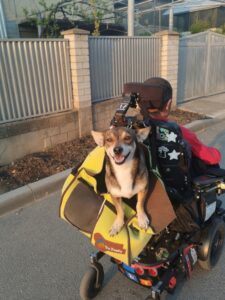
I wanted to regain enough independence to leave the house and walk my dog again.
Before long, our small group expanded. Liz connected me with Bruce Curtis and Levan Talakhadze from Easy Does It, an organization with extensive experience in supporting people with disabilities living independently. Levan is a professional wheelchair technician with years of hands-on experience.
Together they evaluated my situation.
Levan believed a mini joystick might work.
Judi suspected a chin-controlled system would become a reliable long-term solution.
Everyone agreed that proper lower lateral supports would be essential because of my posture and spinal curvature.
The idea of controlling a wheelchair with my chin sounded intimidating.
Then we encountered another obstacle.
Sending equipment alone wouldn’t be enough. Compatibility issues were likely, and there was nobody locally who could install and configure the system.
So the team made an extraordinary decision.
Someone would travel to Moldova.
Olga volunteered.
When I learned that her trip would take nearly eighteen hours, I was stunned.
While she prepared for the journey, we stayed in constant contact. The team sent photos of the equipment, discussed installation strategies, and helped me understand what to expect.
We developed two plans.
Plan A involved mounting a mini joystick on a tray that would support my arm.
Plan B was a chin joystick.
Eventually, Olga arrived.
I was excited.
I was terrified.
And I was desperately hoping this would finally work.
We immediately began testing.
Plan A failed.
Despite hours of adjustments, I still lacked the strength needed to reverse and turn reliably.
So we moved to Plan B.
The moment I touched the chin joystick, everything changed.
I nudged it gently.
The wheelchair moved forward.
It was effortless.
For a few seconds, I simply sat there in disbelief.
Then a realization hit me:
I can actually drive this.
The relief was overwhelming.
We continued refining the setup.
We redesigned the entire mounting system and built a rigid support connected directly to the armrest.
The next morning, we were ready for final assembly.
Then disaster struck.
The display reported a cable error.
For three exhausting hours we searched for the cause.
Olga pored over technical manuals. We checked every connection, every diagram, every component.
Nothing worked.
Out of desperation, we even called Levan despite the fact that it was four a.m. in his time zone.
We tested multiple joysticks.
We disassembled hardware.
We checked everything.
The same error continued to appear.
The possibility of failure began creeping back into our minds.
Finally, we tried one last approach.
We disconnected absolutely everything and rebuilt the entire system from scratch.
This time, the screen powered up perfectly.
The error vanished.
The feeling of relief was indescribable.
From there, everything finally came together.
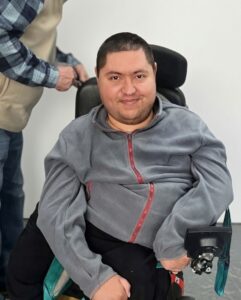
Olga programmed profiles, adjusted settings, positioned supports, and fine-tuned every detail. She had brought professional tools, programming equipment, an OMNI module, multiple joysticks, and everything necessary to complete the installation properly.
She even brought an Xbox Adaptive Controller so that I could play games during the long winter months when getting outside becomes difficult.
After three days of work, the moment I had dreamed about finally arrived.
My first independent trip.
Winter had only recently loosened its grip. Snow still lingered in places, and the air remained cold.
I rolled out of the house.
Then out of the yard.
Everything felt unfamiliar.
The chin joystick still required practice.
But I was moving under my own control.
We headed toward the park where I used to walk my dog.
Along the way, I encountered a broken section of sidewalk. To get around it, I had to cross muddy ground.
The wheels began sinking.
For a moment I panicked.
Then I corrected my direction, backed up, and guided the chair safely onto solid ground.
It may have been a small obstacle.
To me, it was a historic victory.
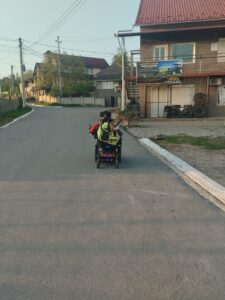
We enjoyed a wonderful walk.
My dog ran happily through the park.
And for the first time in a very long time, I felt free.
The next day, we completed the final adjustments.
Then it was time to say goodbye.
I was genuinely sad to see Olga leave. During those intense weeks of preparation and those few remarkable days together, we had become friends.
Looking back now, I understand something important.
When my mother and I were struggling alone—watching YouTube videos, forcing bolts loose, stuffing foam into gaps, and building improvised solutions—we were doing our best. But we were operating in complete darkness.
No amount of determination could replace expertise.
Without Judi’s clinical insight, Levan’s technical knowledge, Olga’s incredible dedication, Bruce’s support, and Liz’s ability to bring everyone together, none of this would have happened.
Some problems simply cannot be solved alone.
They require skilled people who know exactly what they are doing.
Today, I navigate my home and city independently. We removed thresholds inside the house for smooth riding. I continue gaining confidence with the chin joystick every day. Olga even developed a simple solution that improved grip by covering the joystick with a special mesh material, preventing my chin from slipping.
The wheelchair that once represented pain and hopelessness has become a symbol of freedom.
Most importantly, this experience reminded me that kindness still exists in the world.
A group of strangers chose to help someone they had never met.
They gave me back my independence.
They gave me back my freedom.
And what began as a desperate search for technical assistance became something much more valuable.
To this day, Liz, Olga, and I still talk regularly.
The story didn’t end there.
What started as a search for technical help eventually opened an entirely new chapter in my life. Over time, Liz gave me an opportunity that meant far more to me than I can adequately express. She invited me to join her team at Grassroots Open Assistive Tech and trusted me with the role of system administrator for the Grassroots Open Assistive Tech website, openassistivetech.org.
For someone who had spent so long feeling dependent on others, being trusted with real responsibility was incredibly meaningful. It wasn’t simply a job. It was a chance to contribute, to learn new skills, and to give something back to a community that had already changed my life.
When I think about everything that happened, I realize that I gained much more than a wheelchair. I regained my independence, found new friends, discovered an amazing community, and was given an opportunity to build a future that once seemed impossible.
For all of that, I will always be grateful.
What began as a desperate search for a way to drive a wheelchair ended up changing my life in ways I could never have imagined.
1 Comment Wheelchair cushion giveaway in Oakland! Pass it on!